 Contact us

October 7,2021
What Goes Into Building an eCommerce Website

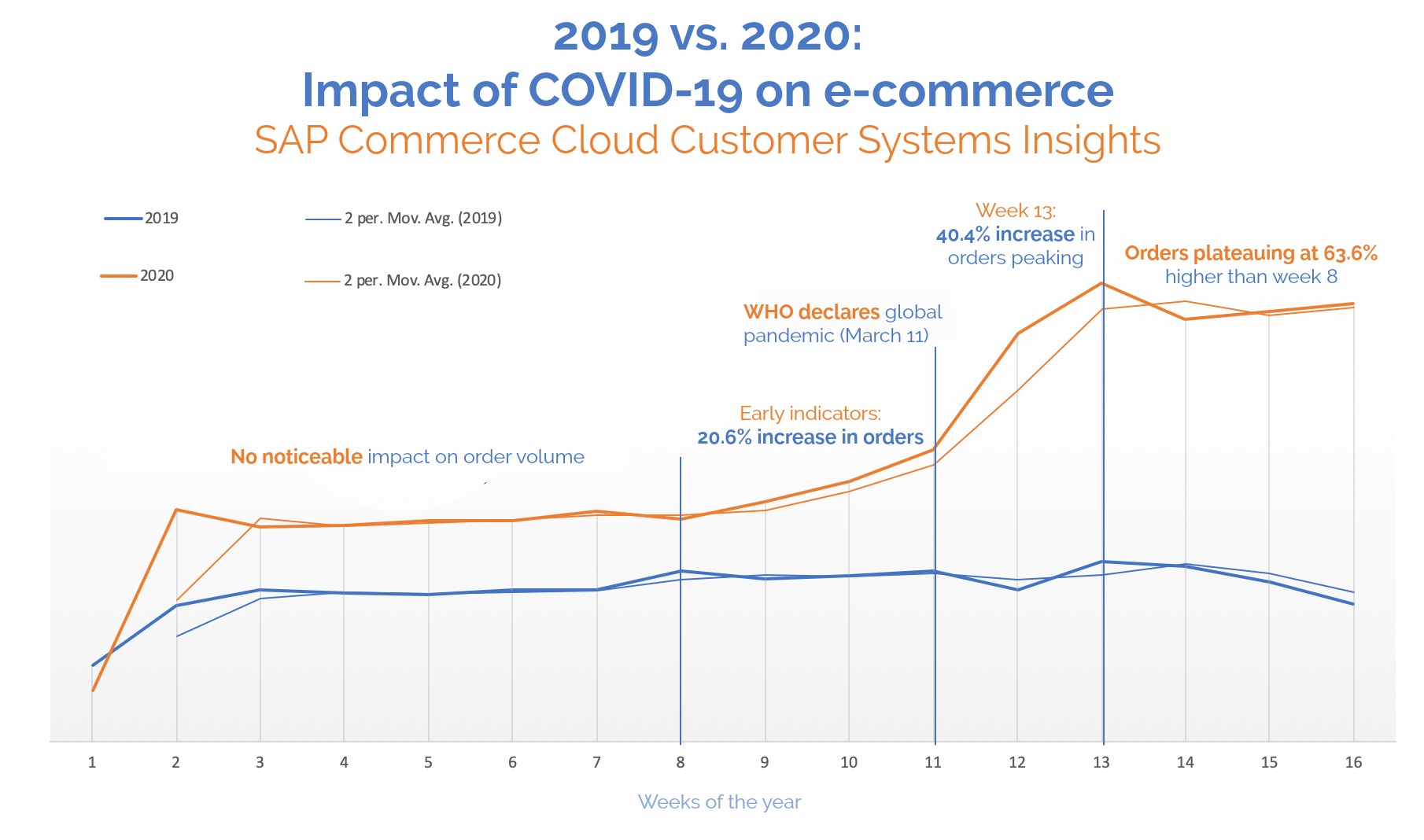
During COVID-19 pandemic, the biggest growth shops and retail stores have seen and experienced for businesses is going digital. Starting from grocery to heavy and big machines every one preferred to buy online via any eCommerce platforms like Amazon, eBay, Wallmart etc.
Not only customers but sellers which include traders, manufactures, suppliers also started thinking seriously for their online store at the earliest.
For the companies looking to get a digital presence, they have 2 main choices when it comes to designing and developing an eCommerce website. They can either opt for open source applications like Magento, WooCommerce or website builders such as Shopify, Ecwid.
Source: https://www.the-future-of-comm…
Planning a good eCommerce website
Regardless of the platform or technology chosen to build the website in, there are certain factors which need to be addressed before and during the design and development process to ensure that the end result is a well thought out and created website. But before anything can start. there are questions that need asked to gather the information to help identify the best solution should be for the website, these include knowing what:
- Online merchandising
- Internationalization / multi-site
- Security
- User experience
- Laws and regulations
- System development
- Omnichannel (inventory management, B2B, Order Management, Ship from Store, etc.)
- Data analytics and testing
- Taxes (including EU and US tax laws)
- Third-party integration
- Promotions (customer segments, related products, etc.)
- Catalog management
- Customization vs. native features
- Returns
- Checkout
- Conversion rate enhancement
After understanding what is needed to help decide on the best platform for the website to be built in, more needs to be understood in reference to:
- Nature of the business
- Who are the customers? (age,class, gender etc)
- What are your products/services?
- Do you have an existing website? Or What’s prompted you to enquire about a new website?
- What are your objectives & expectations of a website?
- Is the content and material to be published (e.g. text, images, logos) already available, or does it require production?
- When you want to go live?
- Your Approximate Budget
- Any reference or competitors websites
- Extra features to be developed or any 3rd party services to be integrated
After receiving the details from the client, a decent proposal can be sent with the project summary including timeline and cost based on the discussion and answers we got from the questionnaire.
Timeline for building an eCommerce website
Once the plan has been laid out, and design concepts approved, the following are the main stages for any eCommerce website that have an effect on the timeline.
- Template/Theme Selection
The website should work on any device where the website should be accessible with the mobile first approach. - eCommerce Implementation
Based on the business flow requirements, not just elegant UI is required, flawless UX is equally important to make sure customers are engaged on the pages and lead them down the conversion path to completing a purchase. To maintain that quality should be never compromised. - Catalogue Population
Populating the website with products and categories is one of the important, core elements of the website. A category page should have enough options in terms filter (layered navigation) to assist customers being able to easily find the products/items they wish to purchase.
The products also need to be listed in the most appropriate way, to make browsing them simpler for the customer, the product types include Simple (singular product), Variable (options such as size or colour), Bundle (multiple products sold as a set).
Product detail pages also have specific requirements to make them appealing, such as gallery, options, description, reviews etc also play an important role to confirm the decision of the customer to finally purchase the product. - Payment Gateway, Shipping Configuration & Checkout
One of the most important parts of a successful eCommerce website is the checkout process. It should be comfortable and easy to use for all your customers, making the process quick and simple. Many of the latest eCommerce systems come with the payment gateways built in, which makes integrating simpler. There are many choices of payment gateways to choose, such as Paypal, Stripe, Braintree, Authorize and you need to choose the right ones, to help make the checkout process easier for your customers. Your checkout and shipping configuration should make sure that when the order has been shipped, the customer is alerted, (normally via email), and that they are able to track the shipment process. - Test & Going-Live
Testing is the final process to ensure everything is working and for final sign-off from the client. Before going live, we will need to make sure that all 3rd party integration/plugins/extensions/modules are equipped with the production/live details instead of sandbox/test details including URL redirection and any analytics (Google, Facebook).
Then the final part when going live is the hosting and domain booking services. If they are being taken care of by the client, we need to verify if the details are working properly or not and send the IP address(es) as well if needed.